
How to increase FPS in World of Tanks: settings for a weak PC (2026)
Information is current as of August 2026.
“Everything lags after the update” is an eternal topic on tank forums: the Core engine is demanding, and on a weak PC the frame rate sags precisely at the most important moments - in mass battles. We have collected working settings for 2026: what to do in the game, in the driver and in Windows to get +15–40% FPS, plus player reviews and analysis of typical misconceptions. The guide is equally suitable for both “World of Tanks” from Lesta and World of Tanks - the engine and settings are the same.
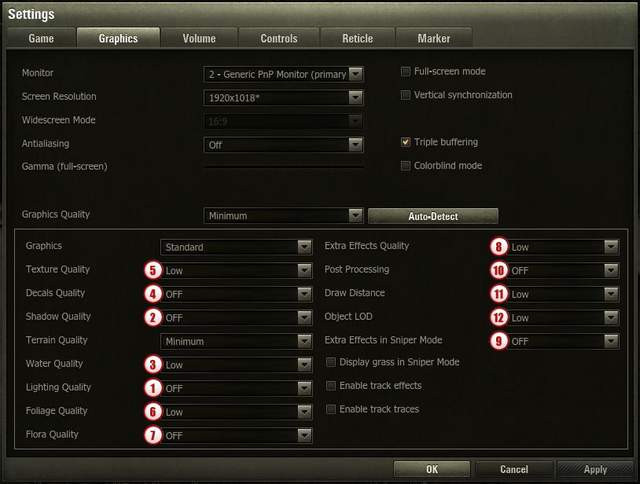
Quick start: 6 settings with maximum effect
You don't have time to read everything - start here. These parameters load the system the most, but have almost no effect on the outcome of the battle:
- Shadow quality → low/offThe most “gluttonous” item for a video card; shadows hardly help in battle.
- Postprocessing → offBeautiful effects “for the picture” that noticeably eat up FPS.
- Improved destruction physics → off.Flying debris puts a lot of stress on the processor, especially a weak one.
- Draw distance → low/medium.It loads the processor, but does NOT affect the detection range of enemies - the light is counted on the server.
- Dynamic resolution change → on.The game slightly reduces the resolution only in moments of drawdown - the picture remains smooth in batches.
- Motion blur → offIt interferes with tracking quick targets and loads the system a little.
Two important “don’t touch”:Do not lower the 3D render resolution below 80%— the picture will turn into mush, and targeting vulnerable areas at a distance will become almost impossible. And don’t rush with “standard” graphics: the minimum of improved rendering looks better than the standard one, and FPS loses a little. Standard - only for PCs older than ten years and built-in video cards.
 How to penetrate tanks in World of Tanks: mechanics of armor and ricochets (2026)