
Best Minecraft Mods 2026: Installation Guide and Modpacks
Information is current as of August 2026.
Mods are the main reason Minecraft doesn't get boring even after years. They add mechanisms and trains, magic, new dimensions, hundreds of mobs and realistic graphics to the game. In this guide, we will look at what mods are worth installing in 2026, how the Forge, NeoForge and Fabric loaders differ, how to install mods correctly and which ready-made modpacks to choose.
What is a mod loader and which one to choose
Mods cannot be installed on pure Minecraft - you first need a mod loader. This is a special layer that launches mods and monitors their compatibility. In 2026, three main loaders are relevant:
| Loader | Features | Who is it suitable for? |
|---|---|---|
| NeoForge | Heir to the classic Forge, the main standard for versions 1.20.5 and later. Huge mod library | For those who want large content mods and modpacks like All The Mods 10 |
| Fabric | Lightweight and fast, the first to be updated for new versions of the game. Best choice for optimization mods | For players with weak PCs and lovers of shaders via Iris |
| Forge | Modding classic. For versions before 1.20.1 it remains the main thing, but new mods are increasingly being released under NeoForge | For those who play on older versions (1.12.2, 1.16.5, 1.20.1) |
Important:Mods from different loaders are incompatible with each other. A mod for Forge will not work on Fabric and vice versa. Before downloading, always check which bootloader and which version of the game the mod is made for.
How to install mods on Minecraft: step-by-step instructions
- Install Java.Minecraft 1.21 and later requires Java 21.
- Launch the desired version of the gameat least once in the official launcher and close it.
- Download the bootloader installerfrom the official website: neoforged.net for NeoForge or fabricmc.net for Fabric. Run the jar file and select "Install client".
- Open the mods folder.In the launcher, go to the “Settings” tab, click on the folder icon next to the profile - the .minecraft folder will open. Find (or create) a folder in itmods.
- Download modswith CurseForge or Modrinth, filtering them by your bootloader and game version, and put the jar files in the mods folder.
- Check dependencies.Many mods require libraries (for example, Fabric API, Curios API) - they also need to be put in mods, otherwise the game will not start.
- Launch the gamethrough the NeoForge/Fabric profile in the launcher.
It’s even easier to install mods through the CurseForge app or the Modrinth launcher: they download the loader, mods and all dependencies themselves - just click “Install” and “Play”.
The best fashions of 2026 by category
Optimization and Performance
- Sodium(Fabric) - completely rewrites the render and increases FPS by 2-5 times without losing the image. Forge/NeoForge has an analogue - Embeddium.
- Lithium— speeds up the internal logic of the game: AI of mobs, physics, block processing. Useful both in single player and on the server.
- FerriteCore— reduces RAM consumption by 30–40%, indispensable in large assemblies.
- Immediately Fast, Entity Culling— small but effective optimizers for the interface and rendering of entities.
Mechanisms, technologies and automation
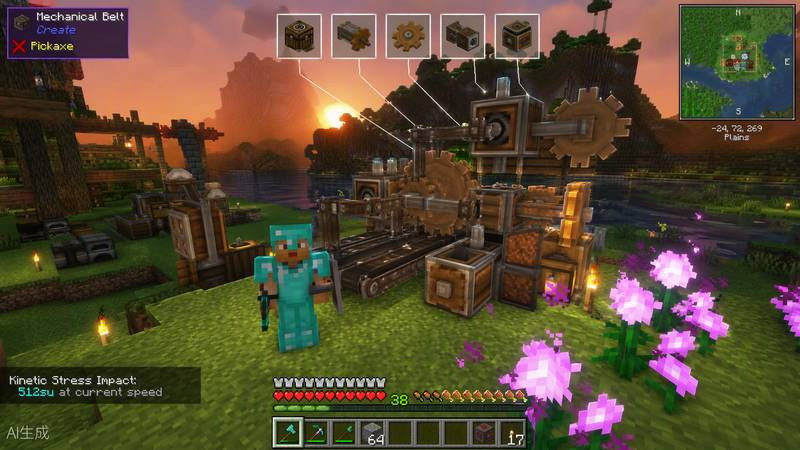
- Create- a legendary mod for gears, conveyors, trains and automatic factories in the steampunk style. One of the deepest mods in the history of the game.
- Mekanism— advanced industry: ore is processed in several stages, there are reactors and digital miners.
- Applied Energistics 2— digital storage of items and autocraft of any complexity.
Magic
- Botania- the magic of nature and flowers that generate mana. Everything is clear, without complex interfaces.
- Ars Nouveau- constructor of your own spells and magical familiars.
- Iron's Spells 'n Spellbooks- a modern mod for spells, magic weapons and dungeons with mage bosses.
World, biomes and adventures
- Biomes O' Plenty— dozens of new biomes, from flowering valleys to volcanic wastelands.
- Twilight Forest- a whole fairy-tale dimension with dungeons and a chain of bosses.
- Alex's Mobs- more than 85 new animals and fantastic creatures with unique behavior.
- YUNG's Better Structures- a series of mods that completely rework fortresses, mines, villages and other structures.
Graphics and shaders
- Iris Shaders(Fabric) - a modern replacement for OptiFine, compatible with Sodium and any shader packs.
- Complementary Shaders- one of the most beautiful and optimized shader packs: volumetric light, fog, reflections.
- BSL Shaders- warm, cinematic picture for medium-sized PCs.
Convenience and interface
- Just Enough Items (JEI)/EMI— viewing all crafting recipes directly in the game. Installs in almost any assembly.
- Xaero's Minimap and World Map— a minimap and a full-fledged world map with points.
- Jade— shows information about the block or mob you are looking at.
The best modpacks of 2026
If you don’t want to collect mods one by one, it’s easier to install a ready-made balanced assembly via CurseForge or Modrinth:
| Modpack | Why is it interesting? | MC version | Recommended RAM |
|---|---|---|---|
| All The Mods 10 | More than 400 mods: technology, magic, research. The final goal is to craft ATM Star | 1.21.1 (NeoForge) | 10–12 GB |
| Better MC | Improved vanilla: new biomes, structures and bosses without overloading with mechanics | 1.20.1–1.21 | 6–8 GB |
| RLCraft | Hardcore survival: thirst, temperature, dragons, skill leveling | 1.12.2 | 4–6 GB |
| Cobblemon | Crosses Minecraft and Pokemon: catching creatures, battles, leveling up the trainer | 1.20.1+ | 6–8 GB |
| Prominence II | RPG package with story, talents, bosses and its own content | 1.20.1 | 6–8 GB |
Mods for your server
If you run a server with mods (read about creating a server in ourseparate guide), three additions are practically mandatory:
- Simple Voice Chat— voice chat directly in the game with spatial sound: only those nearby can be heard.
- Chunky— preliminary generation of map chunks so that the server does not freeze when exploring the world.
- BlueMap or Dynmap— interactive online server map in the browser.
Where to download mods and how to avoid getting a virus
- Modrinth(modrinth.com) andCurseForge(curseforge.com) - The two main secure mod directories. Both have their own launchers.
- Never download mods from third-party “repack” sites or from links in comments - malicious jar files are often hidden there.
- Before installing a large assembly, make a backup copy of the world (saves folder).
- Allocate enough memory to the game: for builds with 100+ mods - at least 4-6 GB of RAM, for monsters like ATM10 - 10 GB or more.
- If the game crashes on startup, read the latest.log file in the logs folder - it almost always says which mod caused the error or which dependency is missing.
Modding in 2026 is more alive than ever: NeoForge and Fabric are quickly updated for the latest versions of the game, and large modpacks have long surpassed many full-fledged RPGs in depth. Start with a couple of mods for optimization and convenience - and then, lo and behold, you are already building a factory in Create or conquering the Twilight Forest.
More about Minecraft
- Best Minecraft servers 2026: BedWars, anarchy and survival (2026)
- Minecraft won't start: how to fix any error (2026)
- Minecraft cheat codes and commands: complete list of console commands (2026)
- At what height to look for diamonds in Minecraft: best level (2026)
- How to increase FPS in Minecraft: working methods (2026)