
Minecraft won't start: how to fix any error (2026)
This information is current as of August 2026.

"Minecraft won't launch" is the most talked-about topic in the Russian-speaking Minecraft community: threads about this issue on Microsoft forums, in VK groups, and under YouTube videos attract thousands of comments. We analyzed hundreds of such reports and compiled solutions for all common errors into a single article.
Step 1. Run the vanilla version
The first thing people recommend on forums (and what actually works) is to select the “Latest Release” option in the launcher—without Forge, Fabric, or OptiFine. If the vanilla game launches, the problem lies with mods or shaders, not with Minecraft itself. Next, disable mods one by one to find the culprit: most often, it’s a mod designed for a different game version or a conflict between two mods.
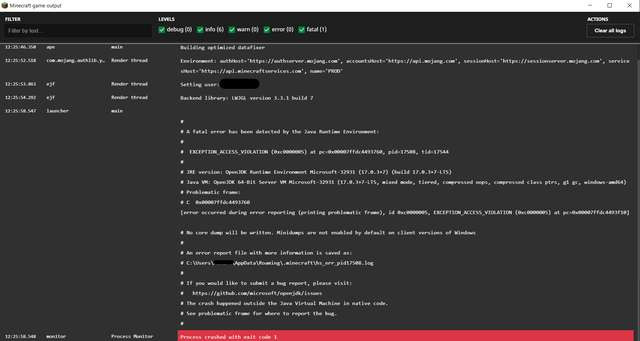
Error 1 (exit code 1) — the most common
The red message “Process crashed with exit code 1” tops the list of complaints. Solutions, in order of decreasing likelihood:
- Update Java. Minecraft 1.18 and newer require Java 17, while the latest versions require Java 21. Uninstall old Java versions via Windows “Apps” and install the latest 64-bit version.
- Update your graphics card driver. This is especially important for AMD and Intel integrated graphics: a crash “into native code” almost always indicates a driver issue.
- Check the game’s path. Cyrillic characters in your Windows username (“C:\Users\Vasya”) prevent the game from launching—move the .minecraft folder to a directory without Russian characters, or add the --workDir parameter to the shortcut.
- Allocate more memory. Insufficient RAM for a modded build causes the same error code: in the launcher settings, raise the limit to 4–6 GB.
- Disable overlays. Discord, GeForce Experience, MSI Afterburner, and antivirus software regularly interfere with the launch.
Black screen after launch
This is usually caused by shaders or an incompatible resource pack: remove them from the shaderpacks and resourcepacks folders. Resetting the graphics settings also helps—delete the options.txt file in the .minecraft folder (settings will revert to default).
Crashes after a few minutes of play
A common cause is overheating or insufficient memory for chunk loading. Reduce the render distance to 8–10 chunks, close your browser if it has dozens of tabs open, and check your laptop’s temperature: on weaker machines, Minecraft often crashes due to CPU throttling.
Login and skin errors
“Failed to log in,” glitchy skins, and inaccessible Mojang servers—check to see if your antivirus or internet service provider is blocking the authentication servers. Logging out of your account and logging back in via the launcher resolves most of these issues.
Analysis of comments: what players are saying
After reviewing discussions on forums and in the comments sections of guides, we’ve identified the audience’s main pain points:
- "Nothing helps" after reinstalling the game. In most of these comments, the problem wasn't with the game, but with Java or a driver—reinstalling Minecraft doesn't affect those.
- Confusion over Java versions. Players install the 32-bit version of Java on a 64-bit system or keep three old versions installed at the same time. Solution: Uninstall everything and install just one up-to-date version.
- Mods for the “wrong version.” Hundreds of comments like “I installed mods—the game crashed”: download mods strictly for your specific version and the correct launcher (a mod for Forge won’t work on Fabric).
- Antivirus software is interfering with the launcher. This is especially common for users of free launchers: add the game folder to the exceptions list.
- “It worked yesterday, but not today.” This is almost always caused by a Windows or driver update—rolling back the graphics card driver usually fixes the issue more often than any other troubleshooting steps.
If nothing has helped
Open the crash log file (crash-reports in the .minecraft folder): the cause is almost always listed in the first ten lines. Searching for the exact error text online leads to a solution faster than any generic advice.
See also
- Download the Minecraft Launcher (2026)
- At what altitude should you look for diamonds in Minecraft: the best level (2026)
- Minecraft: How to Invite Friends to Your Server (2026)
- How to Beat Minecraft and Kill the Ender Dragon: A Complete Guide (2026)
- Best Minecraft Servers of 2026: BedWars, Anarchy, and Survival (2026)
- Everything About Minecraft — All Guides, News, and Reviews
Sources: Microsoft Q&A; OpenJDK Issues
More on Minecraft
- Minecraft Cheat Codes and Commands: A Complete List of Console Commands (2026)
- At What Altitude to Look for Diamonds in Minecraft: The Best Level (2026)
- How to Increase FPS in Minecraft: Methods That Work (2026)
- How to Invite Friends to a Minecraft Server: LAN, IP, VPN, and Realms (2026)
- How to Set Up Your Own Minecraft Server: A Detailed Guide for Beginners (2026)