
How to increase FPS in Minecraft: working methods (2026)
Information is current as of August 2026.
“How to increase FPS in Minecraft?” is an eternal question that collects thousands of answers on forums and hundreds of thousands of views on YouTube. The game looks simple, but the Java Edition engine is power hungry: on a weak PC or with shaders, the frame rate sags even for owners of good builds. We studied the most liked guides, Reddit threads and comments under popular optimization videos and put together a working plan: from five-minute settings to a bunch of mods that gives +200% FPS.
Quick start: settings without mods
First, get the most out of vanilla - it's free and takes five minutes:
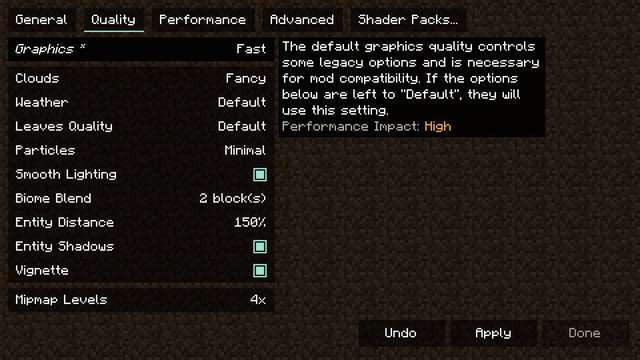
- Render Distance - the main FPS devourer. 12 chunks instead of 32 are almost unnoticeable in the game, but give a huge increase. On a weak PC, set it to 8–10.
- Graphics: "Fast" instead of “Beautiful” - removes transparent foliage and unnecessary effects.
- Particles: reduced or minimal - especially helps in battles and among spawners.
- FPS limit: unlimited and VSync: Off - vertical sync adds input lag.
- Entity Distance: 75–100% — mobs outside the distance are simply not calculated.
- Full screen mode — in it, Windows gives more resources to the game than in the window.
Main community hub: Sodium instead of OptiFine
Just a few years ago OptiFine was the standard, but in the 2026 comments the consensus is clear: Sodium gives more FPS and is more stable. This is a Fabric/NeoForge mod that completely rewrites the game's rendering. According to tests and player reviews, the increase is from +40% to +250%, depending on the hardware. Recommended bundle (everything can be installed via Modrinth or CurseForge in a couple of clicks):
- Sodium — render optimization kernel;
- Lithium — speeds up game logic (ticks, mobs, redstone) without changing the mechanics;
- Iris — shaders on Sodium (OptiFine is no longer needed for shaders);
- Entity Culling — does not render what is not visible (mobs behind walls);
- FerriteCore/ModernFix - reduce RAM consumption.
Important: Sodium is not compatible with OptiFine - use one or the other. Smooth animations, custom cloak skins and zoom from OptiFine are replaced, if necessary, by separate mods (Zoomify, Capes, etc.).
 How to invite friends to a server in Minecraft: LAN, IP, VPN and Realms (2026)