
Best Minecraft Mods in 2026: Top Mods and Modpacks
This information is current as of August 2026.
Mods are the main reason Minecraft never gets boring, even years later. They add mechanisms and trains, magic, new dimensions, hundreds of mobs, and realistic graphics to the game. In this guide, we’ll break down which mods are worth installing in 2026, how the Forge, NeoForge, and Fabric mod loaders differ, how to properly install mods, and which pre-made modpacks to choose.
What Is a Mod Loader and Which One Should You Choose
Mods cannot be installed on a “clean” Minecraft installation—you first need a mod loader. This is a special layer that runs mods and ensures their compatibility. In 2026, there are three main mod loaders:
| Mod Loader | Features | Who It’s For |
|---|---|---|
| NeoForge | The successor to the classic Forge, the main standard for versions 1.20.5 and newer. A huge library of mods | For those who want large content mods and modpacks like All The Mods 10 |
| Fabric | Lightweight and fast, it’s the first to be updated for new game versions. The best choice for optimization mods | For players with low-end PCs and fans of shaders via Iris |
| Forge | A modding classic. It remains the go-to choice for versions up to 1.20.1, but new mods are increasingly being released for NeoForge | For those playing older versions (1.12.2, 1.16.5, 1.20.1) |
Important: Mods from different loaders are not compatible with each other. A mod for Forge will not work on Fabric, and vice versa. Before downloading, always check which loader and which game version the mod is designed for.
How to Install Mods in Minecraft: A Step-by-Step Guide
- Install Java. For Minecraft 1.21 and newer, you need Java 21.
- Launch the desired version of the game at least once in the official launcher and close it.
- Download the loader installer from the official website: neoforged.net for NeoForge or fabricmc.net for Fabric. Run the .jar file and select “Install client.”
- Open the mods folder. In the launcher, go to the “Settings” tab, click the folder icon next to your profile—this will open the .minecraft folder. Find (or create) the mods folder inside it.
- Download mods from CurseForge or Modrinth, filtering them by your launcher and game version, and place the .jar files in the mods folder.
- Check for dependencies. Many mods require libraries (such as the Fabric API or Curios API)—these must also be placed in the mods folder, otherwise the game won’t start.
- Launch the game via the NeoForge/Fabric profile in the launcher.
It’s even easier to install mods using the CurseForge app or the Modrinth launcher: they automatically download the loader, mods, and all dependencies—just click “Install” and “Play.”
The Best Mods of 2026 by Category
Optimization and Performance
- Sodium (Fabric)—completely rewrites the renderer and boosts FPS by 2–5 times without any loss in visual quality. There’s a Forge/NeoForge equivalent called Embeddium.
- Lithium — speeds up the game’s internal logic: mob AI, physics, and block processing. Useful for both single-player and server play.
- FerriteCore — reduces RAM usage by 30–40%; indispensable for large builds.
- ImmediatelyFast, Entity Culling—small but effective optimizers for the user interface and entity rendering.
Mechanisms, Technologies, and Automation
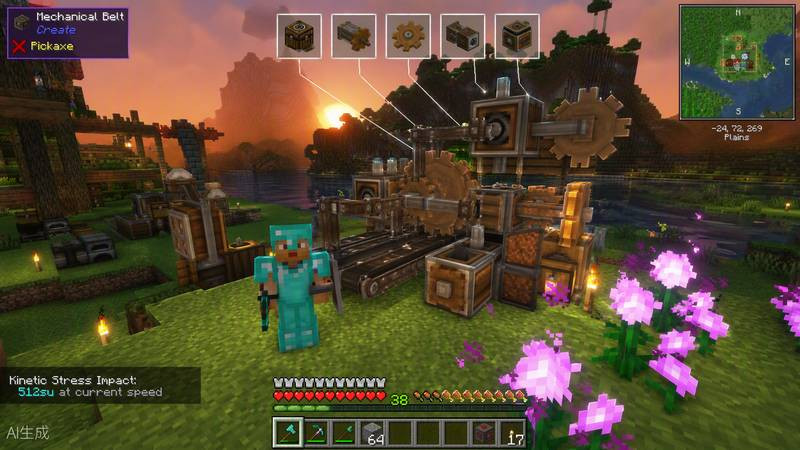
- Create — a legendary mod featuring gears, conveyors, trains, and steampunk-style automated factories. One of the most in-depth mods in the game’s history.
- Mekanism — an advanced industrial system: ore is processed in multiple stages, featuring reactors and digital miners.
- Applied Energistics 2 — a digital inventory system and auto-crafting of any complexity.
Magic
- Botania — nature-based magic and flowers that generate mana. Everything is intuitive, with no complicated interfaces.
- Ars Nouveau — a spell builder and magical familiars.
- Iron's Spells 'n Spellbooks — a modern mod featuring spells, magical weapons, and dungeons with mage bosses.
World, Biomes, and Adventures
- Biomes O' Plenty — dozens of new biomes, from blooming valleys to volcanic wastelands.
- Twilight Forest — an entire fairy-tale dimension with dungeons and a boss chain.
- Alex's Mobs — over 85 new animals and fantastical creatures with unique behaviors.
- YUNG’s Better Structures—a series of mods that completely reworks strongholds, mines, villages, and other structures.
Graphics and Shaders
- Iris Shaders (Fabric)—a modern replacement for OptiFine, compatible with Sodium and any shader pack.
- Complementary Shaders — one of the most beautiful and optimized shader packs: volumetric lighting, fog, and reflections.
- BSL Shaders — a warm, cinematic look for mid-range PCs.
Usability and Interface
- Just Enough Items (JEI) / EMI — view all crafting recipes right in the game. Can be installed on almost any build.
- Xaero’s Minimap and World Map — a minimap and a full-featured world map with waypoints.
- Jade — displays information about the block or mob you’re looking at.
The Best Modpacks of 2026
If you don’t want to collect mods one by one, it’s easier to install a ready-made, balanced modpack via CurseForge or Modrinth:
| Modpack | What Makes It Interesting | MC Version | Recommended RAM |
|---|---|---|---|
| All The Mods 10 | Over 400 mods: technology, magic, exploration. The ultimate goal is to craft the ATM Star | 1.21.1 (NeoForge) | 10–12 GB |
| Better MC | Enhanced vanilla: new biomes, structures, and bosses without overcomplicating the mechanics | 1.20.1–1.21 | 6–8 GB |
| RLCraft | Hardcore Survival: Thirst, Temperature, Dragons, Skill Progression | 1.12.2 | 4–6 GB |
| Cobblemon | A cross between Minecraft and Pokémon: catching creatures, battles, and trainer progression | 1.20.1+ | 6–8 GB |
| Prominence II | An RPG modpack with a storyline, talents, bosses, and original content | 1.20.1 | 6–8 GB |
Mods for Your Server
If you run a modded server (read our separate guide on setting up a server), three add-ons are practically a must:
- Simple Voice Chat — in-game voice chat with spatial audio: you can only hear those who are nearby.
- Chunky — pre-generation of map chunks to prevent the server from lagging while exploring the world.
- BlueMap or Dynmap — an interactive online server map in your browser.
Where to download mods and how to avoid viruses
- Modrinth (modrinth.com) and CurseForge (curseforge.com) are the two main safe mod repositories. Both have their own launchers.
- Never download mods from third-party “repack” sites or via links in comments—malicious JAR files are often hidden there.
- Before installing a large mod pack, back up your world (saves folder).
- Allocate enough memory to the game: for modsets with 100+ mods, at least 4–6 GB of RAM; for “monsters” like ATM10, 10 GB or more.
- If the game crashes on launch, check the `latest.log` file in the `logs` folder—it almost always specifies which mod caused the error or which dependency is missing.
Modding in 2026 is more alive than ever: NeoForge and Fabric are updated quickly to support the latest game versions, and major modpacks have long since surpassed many full-fledged RPGs in terms of depth. Start with a couple of mods for optimization and convenience—and before you know it, you’ll be building a factory in Create or conquering the Twilight Forest.